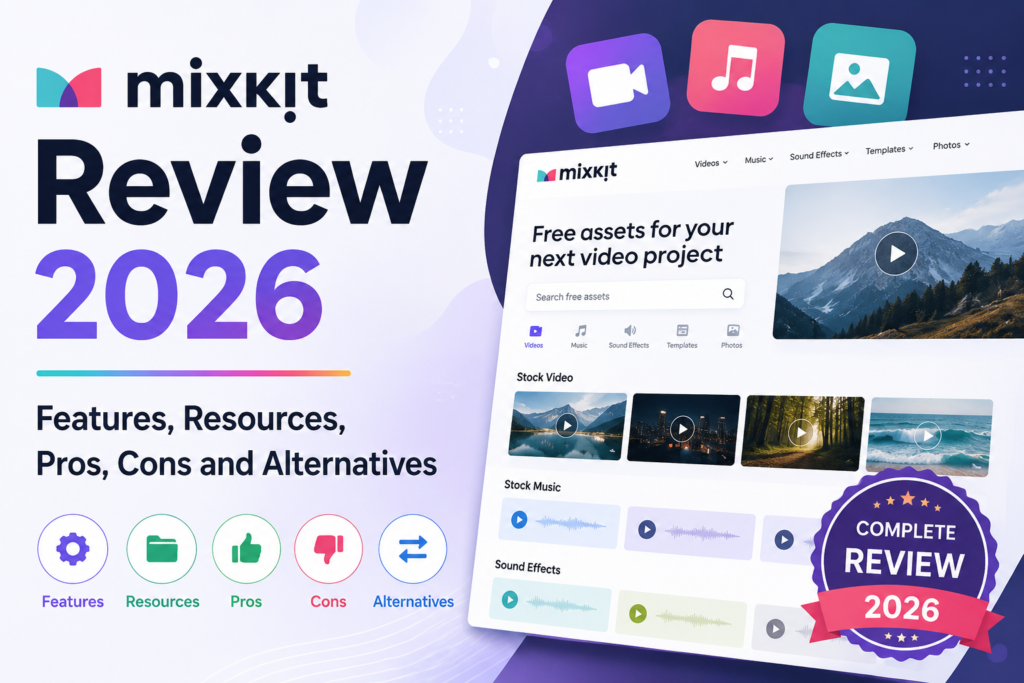
Mixkit Review 2026: Features, Resources, Pros, Cons and Alternatives

Mixkit Platform Overview
Creating high-quality video content has become essential for businesses, content creators, and marketers in today's digital landscape. However, finding affordable stock footage, music, and video templates can be a major challenge. This is where Mixkit comes into the picture. Mixkit has gained significant popularity as a platform offering free stock videos, music tracks, sound effects, and video templates. But is Mixkit really as good as it claims to be? In this detailed review, we will cover everything about Mixkit including its features, resources, licensing, pros, cons, and how it compares to other stock media platforms available in the market.

What is Mixkit?

Mixkit is a free online platform that provides high-quality stock videos, music tracks, sound effects, and video templates for content creators. The platform was launched by Envato, the same company behind popular marketplaces like Envato Elements and ThemeForest. Mixkit was created to offer a generous free alternative to paid stock media platforms. The platform is designed for video editors, YouTubers, filmmakers, social media managers, marketers, and anyone who needs visual or audio assets for their projects. What makes Mixkit special is that all its content can be downloaded and used for free, even for commercial projects, under their generous Mixkit license. Mixkit has grown significantly since its launch and now hosts thousands of high-quality assets across various categories. The platform continues to add new content regularly, making it a valuable resource for content creators on a budget.

How Does Mixkit Work?

Using Mixkit is incredibly simple and straightforward. Users do not even need to create an account to download most of the resources. The platform is designed to be as user-friendly as possible, removing barriers between creators and the assets they need. Users visit the Mixkit website and browse through different categories including stock videos, music, sound effects, and video templates. The platform offers search functionality and filtering options to help users find specific types of content quickly. When users find an asset they like, they can preview it directly on the website. Videos can be played in the browser, music tracks can be listened to, and sound effects can be sampled. Once satisfied, users simply click the download button to get the file in high quality. For video templates, Mixkit offers compatibility with popular video editing software like Adobe Premiere Pro, After Effects, DaVinci Resolve, and Final Cut Pro. Users download the template files and import them into their preferred editing software. The platform works similarly to other creative tools available online like droven.io where everything is accessible through a simple web interface.

Key Features of Mixkit

Mixkit offers a range of features that make it a popular choice among content creators. Here is a detailed look at what the platform provides. The stock video library is one of the main attractions of Mixkit. The platform offers thousands of high-quality video clips covering a wide range of topics including nature, business, technology, lifestyle, abstract visuals, and much more. All videos are available in high definition with many available in 4K resolution. The music library on Mixkit contains a diverse collection of royalty-free music tracks. The music is organized by genre, mood, and theme, making it easy to find the perfect soundtrack for any project. Genres include cinematic, electronic, corporate, ambient, rock, pop, and many others. The sound effects collection provides creators with access to thousands of professional sound effects. From transitions and notifications to ambient sounds and human voices, the library covers virtually every sound effect need for video production. Video templates are another valuable feature of Mixkit. The platform offers ready-to-use templates for Adobe Premiere Pro, After Effects, DaVinci Resolve, and Final Cut Pro. These templates include intros, outros, lower thirds, transitions, and complete video projects. Free downloads with no registration required is a major feature. Most assets can be downloaded immediately without creating an account, which saves time and reduces friction for users. The Mixkit license is generous and allows commercial use of most assets. This makes the platform valuable not just for hobbyists but also for businesses and professional content creators. Regular updates ensure that new content is added to the platform frequently. This keeps the library fresh and provides users with new options to choose from regularly. The platform also features a clean and modern user interface that makes browsing and downloading content a pleasant experience. The website is responsive and works well on both desktop and mobile devices.

Mixkit Pricing

One of the biggest advantages of Mixkit is its pricing model. The vast majority of content on the platform is completely free to download and use. There are no subscription fees, no per-download charges, and no hidden costs for the free content. However, Mixkit also offers premium content through its connection with Envato Elements. Premium assets require an Envato Elements subscription, which provides access to a much larger library of professional resources. The Envato Elements subscription is a separate paid service that offers unlimited downloads of premium stock videos, music, templates, graphics, and more. Pricing varies depending on whether you choose monthly or annual billing, with annual subscriptions offering significant savings. For most users, the free Mixkit content is sufficient for their needs. The premium subscription is only necessary for those who need a larger variety of high-end professional assets.

Pros and Cons of Mixkit

Every platform has its strengths and weaknesses. Here is an honest assessment of Mixkit in table format.
Pros of Mixkit Cons of Mixkit
Most content is completely free Smaller library compared to paid platforms
No account required for most downloads Premium content requires Envato Elements
Commercial use allowed under Mixkit license Limited search filters compared to competitors
High quality videos available in HD and 4K Some categories have limited options
Wide variety of music and sound effects No advanced editing tools on platform
Compatible with major video editing software Cannot upload your own content
Clean and easy to use interface Some popular keywords return limited results
Regular updates with new content Restrictions on certain uses like reselling
Video templates save significant editing time No mobile app available
Royalty free music for all projects Cannot request specific content additions
Fast download speeds License terms can be confusing for beginners
No watermarks on downloaded content Limited customer support for free users

Comparison Table: Mixkit vs Other Stock Media Platforms

Here is a detailed comparison of Mixkit with other popular stock media platforms in the market.
Feature Mixkit Pexels Pixabay Envato Elements Shutterstock
Free Stock Videos Yes Yes Yes Limited No
Free Music Yes Limited Yes Limited No
Free Sound Effects Yes No Yes Limited No
Video Templates Yes No No Yes Extensive Limited
Account Required No No Optional Yes Yes
Commercial Use Yes Yes Yes Yes Yes
4K Video Available Yes Yes Yes Yes Yes
Library Size Medium Large Large Very Large Very Large
Pricing Free Free Free Subscription Subscription
Search Filters Basic Advanced Advanced Advanced Advanced
Mobile App No Yes Yes No Yes
Premium Content Via Envato No No Yes Yes
Software Compatibility Multiple N/A N/A Multiple Multiple
Image Library No Yes Yes Yes Yes
Music Genres Wide Range Limited Wide Range Very Wide Very Wide

Mixkit vs Pexels

Pexels is another popular free stock media platform that competes directly with Mixkit. The main difference is that Pexels focuses primarily on stock photos and videos, while Mixkit offers a more comprehensive selection including music, sound effects, and video templates. Pexels has a larger video library compared to Mixkit, but Mixkit offers more diverse content types. If you need only videos and photos, Pexels might be a better choice. If you need a one-stop shop for various media types, Mixkit is more convenient. Both platforms offer free downloads and commercial use rights, making them excellent budget-friendly options for content creators.

Mixkit vs Pixabay

Pixabay is one of the oldest and largest free stock media platforms on the internet. It offers an extensive library of photos, videos, music, and sound effects. Compared to Mixkit, Pixabay has a much larger overall library but lacks video templates for editing software. Mixkit has a more curated approach to its content, which means the quality is often higher even though the quantity is smaller. Pixabay relies on user contributions, which results in varying quality levels. For users who specifically need video editing templates, Mixkit is the better choice. For general stock media needs with maximum variety, Pixabay offers more options.

Mixkit vs Envato Elements

Envato Elements is the premium subscription service from the same company that owns Mixkit. The relationship between the two platforms is interesting because Mixkit serves as a free showcase of the type of quality available on Envato Elements. Envato Elements offers a vastly larger library with millions of assets including premium templates, graphics, fonts, and more. The trade-off is the subscription cost, which can be significant for users who only need occasional resources. Mixkit is perfect for users who need free assets occasionally. Envato Elements is better for professional creators who need a large variety of premium content regularly. Many users start with Mixkit and upgrade to Envato Elements as their needs grow.

Mixkit License Explained

Understanding the Mixkit license is crucial for using the platform's content legally. The license is generally generous but has some important restrictions that users should be aware of. The Mixkit license allows free use of stock videos for personal and commercial projects. You can use the videos in films, advertisements, social media content, presentations, and most other projects without paying any fees or providing attribution. Music tracks have a separate license that also allows free use in commercial projects. However, the license does not allow you to use the music in apps, games, or templates that you sell or distribute. Sound effects can be used freely in any project including commercial works. There are no restrictions on attribution or licensing fees for sound effects. Video templates have specific licenses that vary by template. Some are completely free while others may require an Envato Elements subscription. Always check the specific license terms before using a template in commercial projects. The license does not allow you to redistribute, sublicense, or resell the original Mixkit content. You also cannot use the content in a way that depicts identifiable people in a negative or offensive manner.

Who Should Use Mixkit?

Mixkit is suitable for a wide range of users in the content creation space. YouTubers and video content creators can use Mixkit assets to enhance their videos without spending money on stock footage and music. The video templates can significantly speed up the editing process. Social media managers who need quick, high-quality visual content for posts, similar to those who use platforms like instapv, can find great resources on Mixkit. The variety of stock videos and music tracks makes it easy to create engaging social media content. Marketers and advertisers can use Mixkit content for campaigns, presentations, and promotional materials. The commercial use rights make it suitable for business applications. Small business owners who cannot afford expensive stock media subscriptions can use Mixkit to create professional-looking marketing materials. The platform is particularly useful for startups working with tight budgets. Educators and trainers can use Mixkit videos and music for educational content, presentations, and online courses. The platform provides a wealth of resources for visual learning materials. Hobbyist video editors and amateur filmmakers can experiment with high-quality assets without any financial commitment. This makes Mixkit an excellent learning resource for those developing video editing skills. However, professional film studios and high-end production companies may find Mixkit's library limiting. They would be better served by premium platforms with more extensive collections of professional-grade content.

Mixkit Alternatives

If Mixkit does not meet your specific needs, several alternatives are worth considering. Pexels offers a large library of free stock photos and videos with a focus on quality. Pixabay provides extensive collections of various media types including illustrations and vector graphics. For premium content, Envato Elements is the natural upgrade from Mixkit, offering millions of assets through a subscription model. Shutterstock and Adobe Stock are industry leaders with massive libraries of high-end stock media. Storyblocks is another subscription-based platform that offers unlimited downloads of stock videos, music, and templates. Artgrid is excellent for filmmakers who need cinematic quality footage. Epidemic Sound specializes in music for content creators. For users exploring various creative tools and platforms, resources like totonavi can help in discovering new options that suit specific creative needs. For those interested in combining AI tools with stock media for content creation, platforms like mindgrasp ai can help with research and content planning while Mixkit provides the visual assets.

Tips for Getting the Most from Mixkit

To maximize the benefits of using Mixkit, here are some practical tips that can help you find and use the best content for your projects. Use specific search terms to find relevant content. Generic searches return too many results, while specific keywords help you find exactly what you need. For example, search for sunset beach drone footage rather than just nature. Preview videos and music before downloading. Make sure the content fits your project's mood, pace, and style. Downloading multiple options gives you flexibility during editing. Combine multiple Mixkit assets to create unique content. Layer different videos, mix music with sound effects, and use templates as starting points for custom creations. Check the license for each asset before using it commercially. While most Mixkit content allows commercial use, there can be exceptions, especially for music and templates. Bookmark assets you might use later. Mixkit allows you to save items to favorites for easy access in future projects. Stay updated with new releases. Mixkit regularly adds new content, so checking back frequently can help you find fresh assets for your projects. Use video templates as a base and customize them to match your brand. This saves time while ensuring your content has a unique look. For users exploring different content creation tools alongside Mixkit, platforms like deepseekplay com offer additional capabilities that can complement your video production workflow.

Common Use Cases for Mixkit

Mixkit content is used across various industries and project types. Understanding common use cases can help you see how the platform might fit your needs. YouTube creators use Mixkit for B-roll footage, intros, outros, transitions, and background music. The platform's wide variety of content makes it perfect for diverse YouTube channels. Social media content creators use Mixkit videos and music for Instagram Reels, TikTok videos, Facebook posts, and other platform-specific content. The high-quality assets help create professional-looking social media content. Marketing teams use Mixkit content for advertisements, promotional videos, product demonstrations, and brand storytelling. The commercial use rights make it ideal for marketing applications. Educators use Mixkit for course videos, presentation backgrounds, educational animations, and instructional content. The variety of educational and abstract content suits various teaching needs. Filmmakers and video producers use Mixkit for prototype videos, mood boards, placeholder content, and final production assets when budget is limited. Web designers and developers use Mixkit videos for hero sections, background videos, and interactive web elements that enhance user experience.

Final Verdict on Mixkit

Mixkit is an excellent free stock media platform that offers tremendous value for content creators on any budget. The combination of free high-quality videos, music, sound effects, and video templates makes it one of the most comprehensive free resources available online today. The platform excels in user-friendliness with its simple interface and no-registration-required approach. The Mixkit license is generous and allows commercial use, which is rare among free platforms. The connection with Envato also provides a clear upgrade path for users who need more extensive resources. However, Mixkit is not without its limitations. The library size is smaller compared to paid platforms and even some free alternatives like Pixabay. Some specific niches may have limited content available, and the search functionality could be improved with more advanced filtering options. The platform is best suited for hobbyist video editors, small businesses, social media managers, YouTubers, and anyone who needs occasional high-quality stock media without paying for a subscription. Professional creators and large production companies will likely need to supplement Mixkit with paid platforms for comprehensive coverage. Overall, Mixkit earns a score of 8.5 out of 10. It represents exceptional value as a free resource and continues to improve with regular content updates. For anyone working with video content, Mixkit deserves a place in your creative toolkit, whether as your primary stock media source or as a supplement to paid platforms.

Leave a Reply

Your email address will not be published. Required fields are marked *